
A good november wallpaper lock screen is a tall, vertical photo of fall — golden leaves, a cozy scene, or a Thanksgiving table — sized to your phone’s screen so the clock and notifications never cover the best part. November is the easiest month of the year to dress up your phone: the colors are already perfect, the season is short, and you will see the image dozens of times a day. Below are 25 designs grouped by style — nature, Thanksgiving, cozy and minimal, and quotes — plus the sizing rules, where to find free wallpapers, and how to set one on iPhone and Android in under a minute.

Key Facts
- 25 designs: 7 nature, 6 Thanksgiving, 6 cozy and minimal, 6 quote designs.
- Best sizes: iPhone — 1170 x 2532 or 1290 x 2796 pixels; most Android phones — 1080 x 2400 pixels. Always use a vertical (portrait) image.
- Lock screen rule: keep the top third of the image simple — that is where the clock and date sit.
- Free sources: your own photos, Unsplash, Pexels, and your phone’s built-in wallpaper gallery.
- Time needed: under a minute to set a wallpaper once you have the image saved.
- Thanksgiving 2026: Thursday, November 26 — swap to a Thanksgiving design the week before, then to a winter one in December.
Quotable: “Your lock screen is the most-seen photo you own — in November, it should look like the season you are actually living in.”
What Makes a Great November Lock Screen
A lock screen is not a poster — it is a photo with things on top of it. The clock, the date, and your notifications cover the top half of the screen, so the best November wallpapers put the interesting part — the leaves, the pumpkin, the table — in the lower two-thirds and keep the sky or the plain background at the top. A busy photo with a bright sky and a busy foreground will fight with the clock; a photo with a calm top and a rich bottom looks clean and expensive. That simple rule is what separates a good november wallpaper lock screen from a pretty photo that fights the clock.
Color matters too. November’s palette is warm: gold, rust, burnt orange, deep red, and brown. Those colors look great on a phone because they are warm against the cold glass, and they make the white clock text easy to read. Avoid wallpapers with white or very light areas at the top — white text on a white sky disappears. If you love a light image, pick one with a darker band at the top, or let your phone add a slight dimming effect when you set it.
Finally, think about the mood you want every time you pick up your phone. November is a short, cozy month between the brightness of October and the sparkle of December. A calm forest path, a cup of cocoa, or a simple quote about gratitude will make you smile dozens of times a day. That is the whole point of a seasonal wallpaper: a small, free upgrade to something you look at constantly.
Nature: Fall Leaves, Forests, and Golden Light
Nature designs are the most popular November wallpapers, and for good reason — nobody has to stage them, they never look dated, and a good autumn photo works on any phone.
1. Golden Forest Path
A straight path through orange and gold trees, leaves on the ground, soft light at the end. It is the classic November wallpaper, and it works because the path leads the eye down to the bottom of the screen, away from the clock.
2. Maple Leaves Close-Up
A single red or orange maple leaf, sharp and close, against a softly blurred background. Close-ups make great lock screens because there is only one subject and nothing competes with the time.
3. Misty Autumn Morning
Fog, bare branches, and a quiet park path in pale gold light. Misty photos are perfect for lock screens because the top half is naturally soft and pale, which makes the white clock easy to read.

4. Fallen Leaves on a Wooden Deck
A top-down photo of red, orange, and yellow leaves scattered on wood. It is simple, colorful, and the flat pattern means no part of the image is more important than another — nothing gets ruined by a notification.
5. Pumpkin Patch at Sunset
Rows of pumpkins in a field, long golden light, a big sky. Keep the pumpkins in the lower half and the sky at the top, and the clock will sit cleanly over the sky.
6. Autumn Lake Reflection
Still water reflecting orange trees, with a calm sky above. Reflections make a wallpaper feel peaceful, and the mirror symmetry looks intentional even on a small screen.
7. Rainy November Window
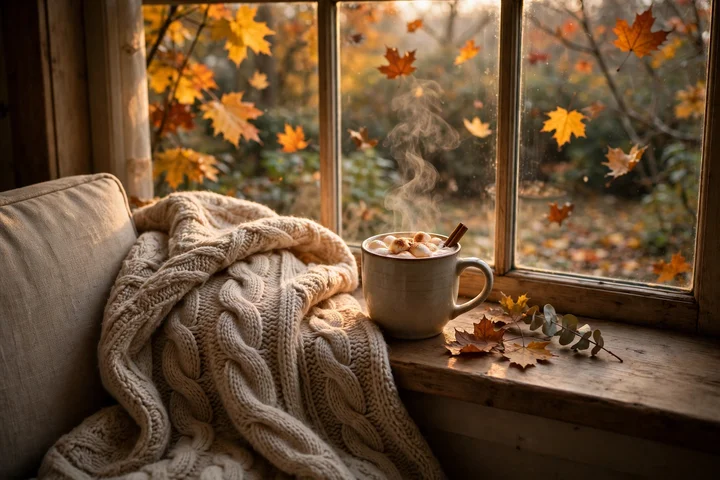
Raindrops on glass with blurred autumn leaves behind them. This one is for people who love the moody side of November — it is dark enough that the clock pops, and it feels cozy rather than gloomy.
Thanksgiving: Turkey, Harvest, and the Family Table
Thanksgiving is Thursday, November 26, 2026, so these six designs are best used for the two weeks around the holiday — set one the weekend before, enjoy it through the weekend after, then switch to winter. For more Thanksgiving ideas for the table itself, our Christmas lights ideas may be about December, but the warm-white glow in those photos is exactly the light a Thanksgiving wallpaper should have.
8. The Thanksgiving Table
A full table from above: turkey, stuffing, cranberries, and candles. An overhead table shot works on a lock screen because the food fills the bottom of the frame and the table runner gives the clock a clean background.
9. Pumpkin and Wheat Centerpiece
A simple centerpiece — small pumpkins, wheat stalks, and a candle on a wooden table. It is elegant without being fussy, and it reads as Thanksgiving without shouting it.
10. Cornucopia of Autumn Fruit
Apples, pears, grapes, and gourds spilling from a basket. The harvest colors are rich and warm, and the basket shape naturally sits low in the frame.
11. Friendsgiving Feast
Friends laughing around a crowded table, plates and glasses everywhere. A candid people photo makes a warm lock screen — pick one where the faces are in the lower half so the clock does not cover anyone’s smile.
12. Pie and Coffee
A slice of pumpkin pie, a mug of coffee, and a knit blanket — the quiet Thanksgiving morning. This is the coziest of the six, and it pairs well with a short gratitude quote if your phone lets you add text to the lock screen.
13. Golden Turkey in the Oven Light
A roast turkey glowing in warm oven light, steam rising. It is the most Thanksgiving image there is, and the warm gold tones look beautiful on an OLED screen.

Cozy and Minimal: Sweaters, Cocoa, and Calm
Not everyone wants a busy photo. Cozy and minimal designs use soft colors, simple compositions, and lots of empty space — and empty space is exactly what a lock screen needs.
14. Chunky Knit and Cocoa
A cream knit blanket, a mug of cocoa with marshmallows, and a book — shot from above on a wooden table. The cream and brown palette is calm, and the clock reads perfectly over the blanket.
15. Minimal Leaf Line Drawing
A single gold leaf, drawn in thin lines, on a deep green or charcoal background. Minimal line art is the easiest lock screen to read: nothing competes with the time, and it looks modern.
16. Warm Candle Glow
One candle in a glass jar, glowing against a dark background, with a few autumn leaves beside it. Dark wallpapers save battery on OLED screens and make the white clock text shine.

17. Cozy Window Seat
A window seat with a plaid blanket, a cup of tea, and rain or falling leaves outside. It is the November feeling in one photo, and the window frame gives the image a natural structure.
18. Neutral Autumn Flat Lay
A pinecone, two leaves, and a small candle arranged on a cream linen background with generous empty space. Flat lays with lots of negative space are lock-screen gold: the clock has somewhere clean to sit.
19. Sweater Weather Portrait
A person in a chunky knit sweater, holding coffee, standing among fallen leaves — shot from behind or at a distance so the scene, not the face, is the subject. Candid and warm, and it never looks like a stock photo.

Quote Designs: Gratitude in Words
Quote wallpapers put the message on the screen, so the photo behind it must be simple — a blurred forest, a plain gradient, or a soft texture. Keep the text short: one line, large, in the center or lower third of the image.
20. “Grateful, Thankful, Blessed”
The classic November trio, in clean white letters over a blurred golden forest. Use a dark, blurred background so the white text stays readable behind the clock.
21. “Give Thanks”
Two words, big and bold, over a warm gradient of rust and gold. Two-word quotes make the best lock screens because they are readable at a glance, even under notifications.
22. “Autumn Shows Us How Beautiful It Is to Let Things Go”
A longer quote that works if your phone lets you place it low on the screen. Pair it with a misty forest or a plain dark background, and keep the font simple.
23. “Hello, November”
A friendly greeting in a handwritten-style font over a photo of fallen leaves. It is cheerful, it is simple, and it is the most-shared November wallpaper every year for a reason.

24. “Count Your Blessings”
White text over a photo of a harvest table or a pumpkin patch, with the text in the lower third. It is a daily reminder that shows up every time you unlock your phone.
25. “Cozy Season”
Two words over a photo of a knit blanket and cocoa. Short, warm, and perfect for the whole month — it works from November 1 through the last day of the month without ever mentioning a holiday.
Sizing: Get the Dimensions Right
The wrong size is the most common wallpaper mistake. A square or landscape photo stretched to fill a tall phone screen will crop badly, usually cutting off the subject or leaving the clock over the wrong part of the image. Use a vertical photo with a ratio close to 19.5:9 (iPhone) or 20:9 (most Android phones). The safe pixel sizes are 1170 x 2532 for most iPhones, 1290 x 2796 for the larger Pro Max models, and 1080 x 2400 for most Android phones. If you download a wallpaper and it is smaller than your screen, it will look soft — look for images at least 1080 pixels wide.
When you set a wallpaper, your phone shows a preview with pinch-to-zoom and drag. Use it: drag the image so the best part sits below the clock, and zoom out if the subject is getting cropped. On iPhone, the depth effect can place the clock behind a subject like a tree or a pumpkin — it looks great with a single bold subject, but turn it off if it makes the time hard to read. On Android, the wallpaper picker usually offers a blur or dim option for the lock screen; a slight dim makes white text readable over any photo. Before you set a november wallpaper lock screen, check the preview on your own phone so the clock and notifications sit where you expect them.
Where to Get November Wallpapers
The best source is your own camera: a walk through a park in November will give you a dozen wallpaper candidates in ten minutes, and a photo you took yourself will always feel more personal than a download. Shoot vertical, get low so the leaves fill the frame, and take the photo in the golden hour before sunset for the warmest light.
For free downloads, Unsplash and Pexels both have large autumn collections — search “autumn leaves,” “November,” “pumpkin,” or “Thanksgiving” and filter for vertical images. Your phone’s own wallpaper gallery also has seasonal collections that are already sized correctly. Avoid random wallpaper apps that ask for permissions or show ads before every download; the free stock sites and your own photos are safer and better.
If you want a quote wallpaper, the free app Canva has phone-wallpaper templates: pick a vertical template, add your photo as the background, type the quote in a clean font, and export at full size. Keep the text in the lower third, use a font size that is readable at arm’s length, and check the preview with your phone’s clock over it before you save.
How to Set It on iPhone
Apple’s own steps are the most reliable reference, and the full guide is on Apple Support: Change your iPhone wallpaper. The short version: open Settings, tap Wallpaper, tap Add New Wallpaper, then tap Photos to choose your own image or pick a category. Customize the font or widgets if you like, tap Add, then tap Set as Wallpaper Pair to use it on both screens or Customize Home Screen to give the Home Screen its own image. You can also set a wallpaper from the lock screen itself: wake the phone, touch and hold the Lock Screen to open the gallery, swipe to a saved design, or tap the Add button to create a new one. To delete a wallpaper, touch and hold the Lock Screen, swipe to the one you want to remove, swipe up, and tap the trash icon.
How to Set It on Android
On most Android phones, the fastest route is a long press on an empty part of the Home Screen, then tap Wallpaper and style (Pixel) or Wallpapers (Samsung), and choose your image from Photos or the gallery. Pick Lock Screen, Home Screen, or both. Samsung’s Gallery app also has a “Set as wallpaper” option in the three-dot menu of any photo, and Google Photos offers the same under “Use as.” If your phone supports it, turn on the lock-screen dim or blur option so the clock stays readable, and check the preview before you confirm — a photo that looks great in the gallery can crop badly once the clock and notifications sit on top of it.
Matching Your Phone to Your Home
A November wallpaper pairs beautifully with a November home. If you are decorating the apartment for the season, our Christmas apartment decor guide covers the same warm, cozy palette — the golds, the candles, the knit textures — and the ideas translate directly to a Thanksgiving table. And once the holidays pass, the season does not end: our winter bucket list ideas for families has 25 activities for January through March, so the cozy feeling your lock screen starts in November can carry the whole family through winter.
FAQs About November Wallpaper and Lock Screens
What size should a November wallpaper be?
Use a vertical image: 1170 x 2532 pixels for most iPhones, 1290 x 2796 for Pro Max models, and 1080 x 2400 for most Android phones. Anything at least 1080 pixels wide will look sharp.
Why does my lock screen crop my wallpaper?
Because your phone’s screen is taller than most photos. Use a vertical image with a ratio near 19.5:9, and drag it in the preview so the subject sits below the clock before you confirm.
Where can I get free November wallpapers?
Your own photos are the best source, and Unsplash and Pexels have large free autumn collections. Search for vertical images of fall leaves, pumpkins, or Thanksgiving scenes.
How do I make the clock readable over a busy wallpaper?
Keep the top third of the image simple and dark, use your phone’s lock-screen dim or blur option, or pick a photo with a plain sky at the top. White clock text needs a dark background behind it.
Can I use a different wallpaper for the lock screen and Home Screen?
Yes. On iPhone, tap Customize Home Screen when you set a wallpaper; on Android, the wallpaper picker asks whether to apply it to the Lock Screen, the Home Screen, or both.
When should I change my November wallpaper?
Set a fall design on November 1, switch to a Thanksgiving design the week before Thursday, November 26, 2026, and move to a winter design in early December.
The Bottom Line
The best november wallpaper lock screen is a vertical fall photo with a calm top third, warm November colors, and the subject sitting below the clock — and the easiest way to get one is to take it yourself on a golden-hour walk. Pick a design from the list, check the size, set it in under a minute, and enjoy a phone that feels like November every time you pick it up.
Leave a Reply